


Case study: from brand concept to a voice-first AI business operating system
Brillama.app
Business at the speed of speech. Brillama brings point of sale, stock, accounting, tax and business insights into one place, and lets small business owners run it by talking to it. I took it from brand and UX/UI through architecture, full-stack development and AI to a live product.
Rethinking how owners work with their own business
Brillama started with a simple but ambitious idea: business software should not make small business owners feel like accountants, data entry clerks or software administrators.
It grew into an AI business operating system that brings together point of sale, inventory, accounting, tax, insights, invoicing, multi-location management and conversational AI. The defining interaction is voice. Instead of tapping through screen after screen, an owner can simply say what happened. I worked on it from the first brand and product thinking through UX/UI, system architecture, development, AI integration and launch.
Too many disconnected tools
Most small business software splits the business into pieces. One system for sales, another for stock, a spreadsheet for reporting and an accountant's package for the numbers. As the business grows, the owner becomes the person responsible for keeping all of it accurate and connected.
So the opportunity was not to build more software. It was to reduce how much software thinking the owner has to do. One question guided the whole project: what if running your business felt more like having a conversation than operating accounting software?
An identity that feels intelligent, not intimidating
The identity had to signal intelligence without falling into the usual AI clichés, or the cold look of accounting and enterprise software. Brillama had to be credible enough to hold financial records, and friendly enough for a shop owner, wholesaler, restaurant or sole trader to use every single day.
The logo turns the two Ls into a sound wave, so the name itself carries the idea of speaking to your business, with the line Press. Speak. Done. The full system covers colour, type and a component kit, built as design tokens shared by the marketing site and the product.
Clear space of 1.5 times the cap height. Minimum size 120px on screen and 24mm in print.

A compact mark for the mobile launcher and browser tab.
One system, not two separate exercises
I did not treat branding and product design as separate jobs. The brand set the personality, and the product had to turn that personality into navigation, dashboards, cards, forms, tables, charts, POS screens, notifications and conversations.
That mattered because Brillama is not a marketing site. It is an operational system with many modules and several types of user, all of which needed to feel like one product.
- Point of sale
- Inventory management
- AI inventory import
- Customer records
- Sales history
- Expense tracking
- Supplier management
- Real-time accounting
- Profit and loss
- Balance sheet
- VAT and tax insights
- Automated invoicing
- FIFO valuation
- Business insights
- Operational reminders
- Multi-location control
- Role permissions
- Voice AI
- Conversational AI
- Executive analytics
Making a complex system feel simple
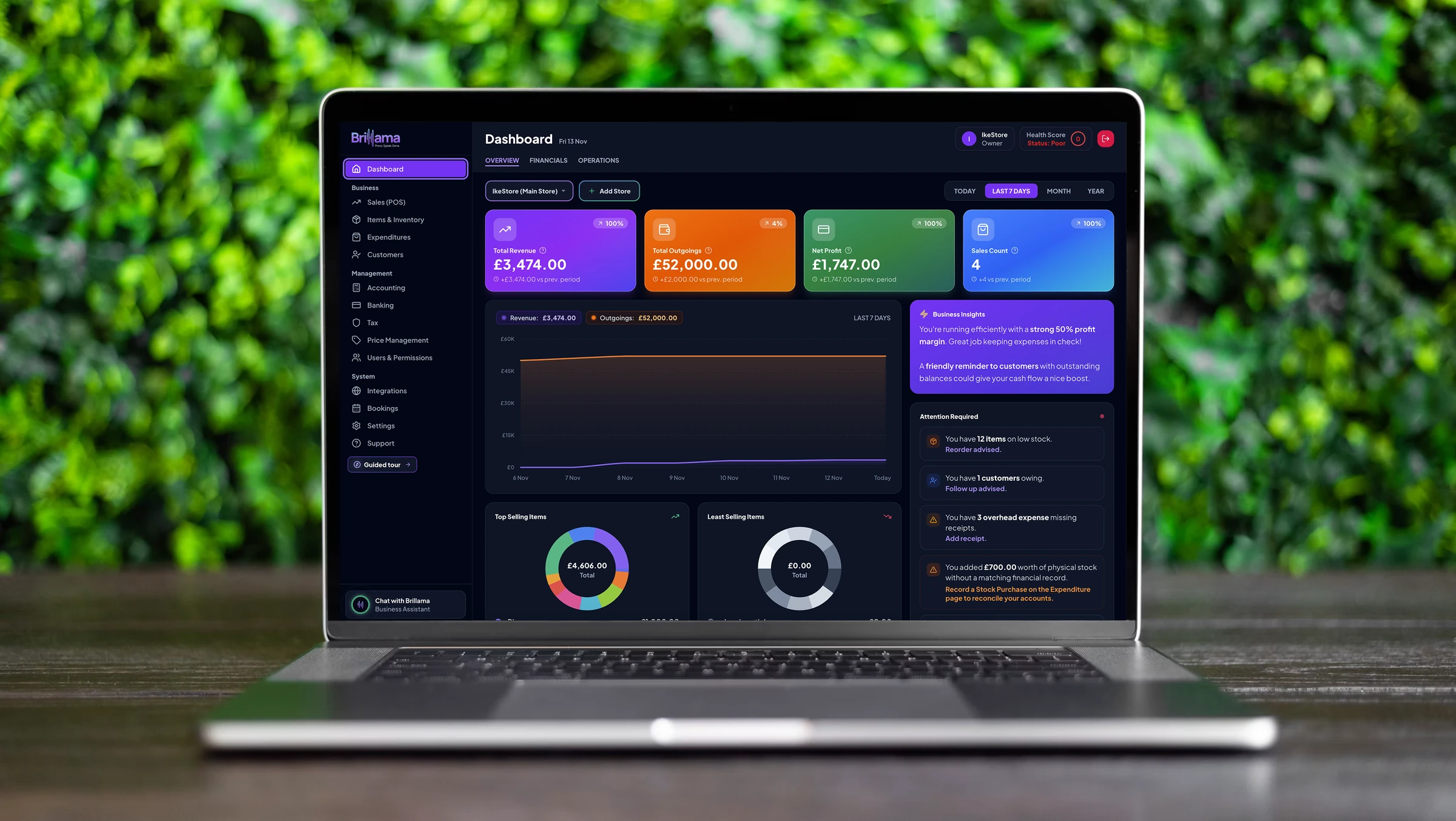
Accounting, inventory, sales and tax are information heavy. Show everything at once and people freeze. The design sets a clear order: what owners need right now, what they need now and then, and what stays available without getting in the way.
Rather than asking people to understand the database underneath, Brillama is organised around the tasks they actually do. The dashboard leads with revenue, outgoings, profit and sales, then a short list of things that need attention, such as low stock or a missing receipt.
Built in, not bolted on
Many small business owners are not sitting at a perfect desk with perfect eyesight. Brillama includes an accessibility panel so each person can make the app easier to read on their own device, and the settings are remembered.
It works alongside the browser's own zoom and reading tools, and a guided product tour walks new users through the dashboard, inventory, POS, expenses and accounting step by step.
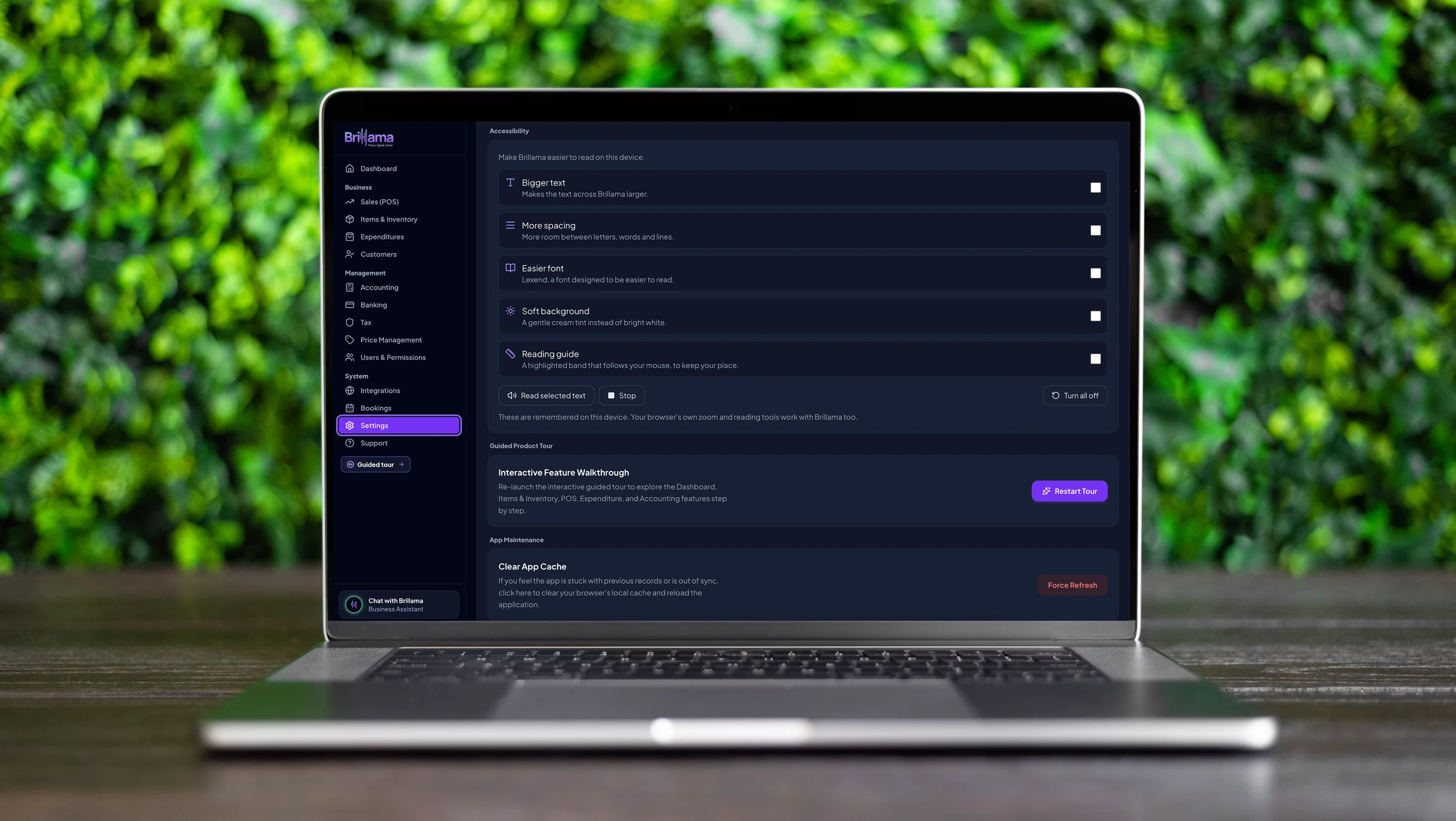
- Bigger textMakes the text across Brillama larger.
- More spacingMore room between letters, words and lines.
- Easier fontSwitches to Lexend, a font designed to be easier to read.
- Soft backgroundA gentle cream tint instead of bright white.
- Reading guideA highlighted band that follows the mouse to help people keep their place.
- Read selected textReads any selected text aloud, with a stop button.
Voice as a first class way to work
The most distinctive decision was to make voice a core interaction rather than a novelty. If an owner can explain what happened in ordinary words, the software should understand and act on it.
That is the difference between a chatbot and an operational assistant. A chatbot answers questions. Brillama understands the business, finds information and carries out actions across its modules, while showing what it did so the owner stays in control.
“I just sold three coffees for £9.”
Removing hours of data entry
Small businesses receive product information through supplier invoices, spreadsheets and receipts. Typing hundreds of items into a system by hand is exactly the kind of work automation should remove.
Brillama reads an uploaded invoice, extracts the items, suggests categories and cost and selling prices, and asks the owner to review before anything is saved. The stock is then ready to sell.
Designed for a busy counter
A POS is used while serving customers, so it cannot behave like an admin dashboard. It needs speed, clarity and instant feedback, with large touch targets and as few steps as possible.
The POS is part of the wider system, so every sale sets off a chain of connected updates that the owner never has to manage by hand.
Inventory and money in the same world
Cost and selling price shape margin. Stock levels change inventory value. Sales drive revenue, expenses affect profit and tax depends on every recorded transaction. Brillama treats these as one connected system, with FIFO (first in, first out) costing linking stock to real margins.
Showing a number on screen is easy. Designing the system that decides where that number comes from, and how it changes when the next transaction happens, took careful data modelling and engineering.
The right view for each person
A business platform cannot treat everyone the same. Roles shape the interface, not just what people are allowed to see, and they work across multiple locations.
Owners can also ask plain questions about profit trends, best sellers or stock running low, and get a short, useful answer instead of digging through reports.
Full financial performance, reports and administrative control.
Day to day operational oversight, without access to sensitive settings.
A fast, focused point of sale and nothing to get in the way.
Accountable AI on solid foundations
Brillama could not be solved by frontend work alone. It needed a connected architecture for accounts, business data, inventory, transactions, accounting, permissions, AI, integrations and real-time updates, built in TypeScript with React, Node.js and Express on Google Cloud.
The hardest part of the AI was accountability. When an owner says “Change the price of Basmati Rice to £3”, the system has to find the exact product, check the person's permissions, make the change and keep an audit trail. Business records are encrypted in transit and at rest, each business's data is kept separate, and it is never used to train public AI models.
Built to be a real product
Brillama was designed as a commercial SaaS product from day one, with three clear UK pricing tiers that grow with the business.
Essential POS, basic inventory, automatic receipts and core sales tracking.
Full accounting, profit and loss, VAT reports, the voice assistant and AI invoice extraction.
Multi-location sync, team role permissions, custom analytics and priority processing.
Four stages, from idea to live product
Brillama followed the same four stage process I use on every project, applied here across brand, product, data and AI.
User interviews, an audit of daily friction, gaps in the market and product opportunities.
Information architecture, journey maps, design tokens, data schemas and cloud structure.
Frontend and backend engineering, Google Cloud infrastructure, the voice pipeline and the connected POS.
Performance tuning, voice recognition accuracy, feedback loops and preparing to scale.
What made Brillama complex
| Layer | What it had to handle |
|---|---|
| Brand | A distinctive identity for an approachable yet intelligent AI business platform |
| UX/UI | Many business modules presented through a calm, low-effort interface |
| POS | Fast transaction flows and instant sales recording under pressure |
| Inventory | Catalogues, quantities, tiered pricing, stock movements and FIFO valuation |
| Accounting | Revenue, expenses, profit and loss and balance sheet kept in sync |
| Tax | UK VAT reporting and automatic financial summaries |
| AI | Natural-language questions, operational actions and invoice reading |
| Voice | Hands-free speech that carries out real business actions |
| Permissions | Owner, manager and cashier access across several locations |
| Infrastructure | A cloud-hosted production application on Google Cloud |
I didn't stop at the interface. I built what was behind it.
- ✦Brand identity and visual system
- ✦End-to-end UX/UI design system
- ✦Voice and conversational AI engine
- ✦Point of sale interface
- ✦AI inventory and invoice extraction
- ✦FIFO valuation and real-time accounting
- ✦Accessibility settings and a guided product tour
- ✦Multi-location and role-based access
- ✦Google Cloud infrastructure and production deployment